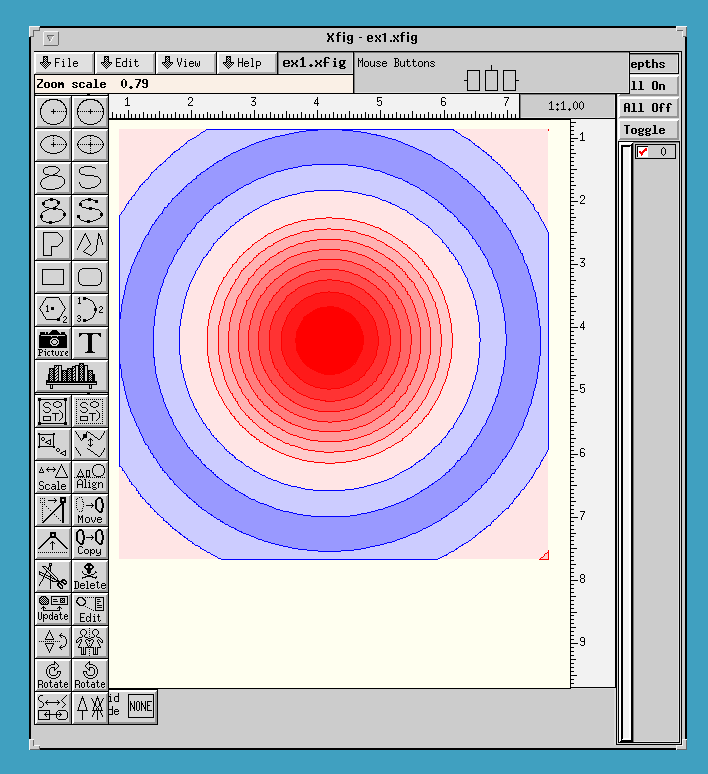
	program moocow
	dimension a(20000)

	integer*4 jwg_create_handle

 	parameter (ix=101,iy=101,iw=150,icolor=1,width=0.0)

	jx=ix/2
	jy=iy/2
	sx=5.0/(1.0*jx)
	sy=5.0/(1.0*jy)

	do j=1,iy
	 y=(j-jy)*sy

	 k=iw*(j-1)

	do i=1,ix
	 x=(i-jx)*sx

	 a(k+i)=sinc(r(x,y))

	end do
	end do


C		Create a handle
C		Args are format and filename
C		format may currently be
C		0 for xfig files
C		1 for CGM  files
C		2 for writing directly to the screen in portrait
C		3 for writing directly to the screen in landscape
C	NB: These two are required as adding a matrix rotates the vectors
C	which you would rotate back on the peice of paper using your hands
C	monitors tend to be heavier.
C

	ihandle=jwg_create_handle(0,'ex1.xfig')

C		Pass data
C		ix is the width
C		iy is the height
C		The offset into the array of (x,y) is calculated
C		as x+iw*(y-1)
C

 	call jwg_pass_data(ihandle,a,ix,iy,iw)

C		Set the transformation matrix to
C		jwg_set_xform(handle,a,b,c,d,e,f) and
C		jwg_add_xform(handle,a,b,c,d,e,f)
C
C		Set the transformat matrix to, or
C		conctenate the transform matrix with the matrix
C
C		/c d a\
C	   M =	|e f b|
C		\0 0 1/
C
C		(acts on vectors of the form (x,y,1))
C
C		NB if the device is left handed it is safer to use
C		jwg_add_xfrom as the initial matrix may not be the
C		indentity matrix
C
C		jwg_def_xform(handle) will reset the transfomration
C		matrix to the default which gives a right handed user space.
C		which (for an A4) extends from (0,0) to (1000,1414.21)
C		use a rotation (-90 degres) to get landscape mode
C
C		note also that push and pop can be used to store previous
C		transform spaces.
C
C		Transforms are concatenated from the right eg
C		T_new=T_old M
C
	call jwg_def_xform(ihandle)
C	want landscape
	call jwg_add_xform(ihandle,0.0,1414.2,0.0,1.0,-1.0,0.0)


C
C	since the distance between elements of the array is 1
C	and the contor plot will fill the space (1,1)-(101,101)
C	te-he [don't you wish you had zero bassed arrays!]
C
C	and we want to fit our contour plot into a fixed space (100,100)-(900,900)
C	we need to adjust the transform matrix before we contour
C	first we save the existing xform matrix using push then we scale
C 	by 800/(ix-1) and 800/(iy-1)
C 	and then fix the offset

C	pushes the current state of the handle (colors,widths,densities,
C		transformat matrix data etc..) onto a stack (unique to the
C		particual handle) from which it can later be popped
C		also pushes the current line onto a stack so we may
C		start a new one...

	sx=800.0/(1.0*(ix-1))
	sy=800.0/(1.0*(iy-1))

	call jwg_push_state(ihandle)

	call jwg_add_xform(ihandle,101.0,101.0,sx,0.0,0.0,sy)
C 	now fix offset of one
	call jwg_add_xform(ihandle,-1.0,-1.0,1.0,0,0,1.0)

C	set pen attributes the pen is used to render lines
C	jwg_set_pen(handle,red,green,blue,width)
C	red,green,blue real*4 color intensity 0,0,0=black 1,1,1=white
C	width is the width which will scale according to the determinant
C	of the transform matrix. if the width is 0 this will produce the
C	finest line that the format is capable of supporting.
C
C	saturated green - thin lines

	red=0.0
	green=1.0
	blue=0.0

	if (icolor.eq.0) then
		gray=red*0.35+0.54*green+0.11*blue
		red=gray
		green=gray
		blue=gray
	endif

	call jwg_set_pen(ihandle,red,green,blue,width)

C	Draw in the 0 level contour
C
C	jwg_contour(handle,level,side,line)
C
C	level is the level of the contour.
C
C	side (integer*4) controls how the contour is closed
C	If side is 0 the contour is made of disjoint polylines.
C	If |side|=1 then the contour is made of connected polygons which
C	go clockwise for side=-1 and and anticlockwise for side=1 following
C	the convention that points to the left of the lines are enclosed.
C	[it's easier to try this both ways and see which works than to
C	think about it.] Note that side doesn't control wheter polygons
C	or lines are drawn.
C
C	(for polygons) if side is +1 then the (shaded) inside of the
C	contor encloses vales greater than level, if side is -1 then the
C	inside of the contor encloses values less than level.
C
C	line (integer*4) is non zero to draw lines and zero to draw polygons
C	[which will neccessarily be closed]
C
C	jwg_contour assumes that your data is small compared with 1.0e20
C	near the boundaries of the box your are contouring. If this is not
C	true - worry.


C       Start from the most negative end and head upwards
C

	do i=1,10
	 clevel=1*((11-i)*0.1)
	 red=1.0
         green=(i*0.1)-0.1
	 blue=(i*0.1)-0.1

C	obviously we get grey if we have equal ammounts of red green and blue
C 	by convention to get the grey version (luminance of a color) we use
C	the following formula from the NTSC. This is irrelavant you could.
C	use anything you liked.

	if (icolor.eq.0) then
		gray=red*0.35+0.54*green+0.11*blue
		red=gray
		green=gray
		blue=gray
	endif

	 call jwg_set_brush(ihandle,red,green,blue,0.0)
	 call jwg_contour(ihandle,clevel,1,0)

	red=1.0
	green=0.0
	blue=0.0

	if (icolor.eq.0) then
		gray=red*0.35+0.54*green+0.11*blue
		red=gray
		green=gray
		blue=gray
	endif

	 call jwg_set_pen(ihandle,red,green,blue,width)
	 call jwg_contour(ihandle,clevel,0,1)

	end do

	do i=1,10
	 clevel=(-i*0.1)*1
	 red=1.0-i*0.2
         green=1.0-i*0.2
	 blue=1.0

	if (icolor.eq.0) then
		gray=red*0.35+0.54*green+0.11*blue
		red=gray
		green=gray
		blue=gray
	endif

	 call jwg_set_brush(ihandle,red,green,blue,0.0)
	 call jwg_contour(ihandle,clevel,1,0)

	red=0.0
	green=0.0
	blue=1.0

	if (icolor.eq.0) then
		gray=red*0.35+0.54*green+0.11*blue
		red=gray
		green=gray
		blue=gray
	endif

	 call jwg_set_pen(ihandle,red,green,blue,width)
	 call jwg_contour(ihandle,clevel,0,1)

	end do

	red=0.0
	green=1.0
	blue=0.0

	if (icolor.eq.0) then
		gray=red*0.35+0.54*green+0.11*blue
		red=gray
		green=gray
		blue=gray
	endif

	 call jwg_set_pen(ihandle,red,green,blue,width)
	 call jwg_contour(ihandle,0.0,0,1)


C	empty the stack - this restores the previous transform matrix.
	call jwg_pop_state(ihandle)

C 	Now draw a nice box round the countor plot - but in a pervese
C	way to show pushing/poping of current lines
C
C	jwg_add_point(handle,x,y) adds a point to the current path
C		whose length is limited only by available memory
C	jwg_reset_point(handle)   may be used to remove all points
C		from the current path
C	jwg_close_line(handle)	  turns the path into a line and
C		resets the path. (line drawn in current pen)
C	jwg_close_polygon(handle) (what do you think?)
C
C	NB: jwg_push_state pushes the current path - but gives
C	a new empty path in the new state. This is not what happens
C	to other things like pen color.
C
C	black pen
 	call jwg_set_pen(ihandle,0.0,0.0,0.0,width)

C	for the paranoid
	call jwg_reset_point(ihandle)

	call jwg_add_point(ihandle,100.0,100.0)
	call jwg_add_point(ihandle,100.0,900.0)
C
C	Halfway trough drawing this box were going to draw
C	another box arround the first one
C
	call jwg_push_state(ihandle)
C	 make this a red line
 	 red=1.0
	 green=0.0
	 blue=0.0

	 if (icolor.eq.0) then
		gray=red*0.35+0.54*green+0.11*blue
		red=gray
		green=gray
		blue=gray
	 endif

	 call jwg_set_pen(ihandle,red,green,blue,width)

	 call jwg_add_point(ihandle,90.0,90.0)
	 call jwg_add_point(ihandle,90.0,910.0)
	 call jwg_add_point(ihandle,910.0,910.0)
	 call jwg_add_point(ihandle,910.0,90.0)
	 call jwg_add_point(ihandle,90.0,90.0)
	 call jwg_close_line(ihandle)
        call jwg_pop_state(ihandle)

C
C	Now we'll finish off the box. which is black
C

	call jwg_add_point(ihandle,900.0,900.0)
	call jwg_add_point(ihandle,900.0,100.0)
	call jwg_add_point(ihandle,100.0,100.0)
	call jwg_close_line(ihandle)


C 	now draw a box round the whole page

	call jwg_add_point(ihandle,0.0,0.0)
	call jwg_add_point(ihandle,1414.21,0.0)
	call jwg_add_point(ihandle,1414.21,1000.0)
	call jwg_add_point(ihandle,0.0,1000.0)
	call jwg_add_point(ihandle,0.0,0.0)
	call jwg_close_line(ihandle)

C	and a slash across the middle
	widthmy=100.0
	call jwg_set_pen(ihandle,red,green,blue,widthmy)
	call jwg_add_point(ihandle,500.0,1000.0)
	call jwg_add_point(ihandle,500.0,0.0)
	call jwg_close_line(ihandle)

C 	check scaling

	call jwg_add_xform(ihandle,0.0,0.0,10.0,0,0,10.0)

	widthmy=10.0
	call jwg_set_pen(ihandle,red,green,blue,widthmy)
	call jwg_add_point(ihandle,80.0,100.0)
	call jwg_add_point(ihandle,80.0,0.0)
	call jwg_close_line(ihandle)

C	check text

	call jwg_set_textcolor(ihandle,0.0,0.0,0.0)
	call jwg_set_textheight(ihandle,10.0)
	call jwg_draw_text(ihandle,30.0,0.0,"MOOCOW  ")

	call jwg_add_xform(ihandle,0.0,0.0,0.1,0,0,0.1)

	call jwg_set_textcolor(ihandle,0.0,0.0,0.0)
C	call jwg_set_textheight(ihandle,100.0)
	call jwg_draw_text(ihandle,300.0,300.0,"MOOCOW  ")

	call jwg_set_textcolor(ihandle,0.0,0.0,0.0)
	call jwg_set_textheight(ihandle,100.0)
	call jwg_draw_text_matrix(ihandle,300.0,600.0,0.0,1.0,
     C		-1.0,0.0,"MOOCOW  ")

C	deallocate the resources associated with the data
C	NB this needs to be done at the same level of push/pop where the
C	the data resources were allocated - (otherwise nasty things might
C	happen)

	call jwg_destroy_data(ihandle)
	call jwg_destroy_handle(ihandle)

	end

	function r(x,y)
	r=sqrt((x*x)+(y*y))
	return
 	end

	function sinc(a)

	if(a.ne.0.)then
		sinc=sin(a)/a
	else
		sinc=1.0
	endif
 	return
	end